Generate a UUID for a chosen field


Hi,
How do I generate a UUID for a chosen field where the data type is Text with 38 characters?
Regards,
Praveen
Comments
-
Hi Praveen - can you expand a bit on what you're looking for here? You need some unique identifier - for a given hole? or row? or column? If you can explain a bit what you are trying to achieve - we can offer some ideas to achieve it.
0 -
Hi @DavidKerr1,
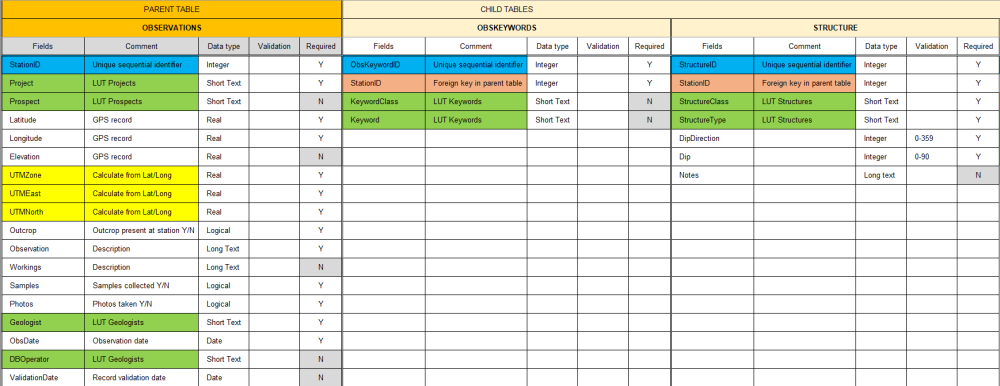
I've attached a screenshot of the database design for our Field Observations. I originally set up a parent-child table structure in QGIS for use in QField, which prompted my initial question about unique identifiers for replicating it in MX Deposit.
However, I've since realized that MX Deposit child tables don't require explicit unique identifier fields, as headers and tables can be configured directly within the Activity settings.
For my learning, I would like to know is there any function to generate unique identifier fora chosen in MX Deposit?
Thanks.
0 -
Could you just use the "point number" string value as your StationID? That's your primary key in the main table, and the foreign key in the child tables. You'd have to change the data type - but if you just keyed off those values, then you could use MX Deposit exports as is.
Everything in MX Deposit has unique identifiers, but they typically aren't exposed in exports. Rows in tables (your child tables) do have an "ID" value that can be exported - and this is effectively a GUID. So you could pull that out and use that as your primary keys in your child tables.
1 -
Thank you for the explanation. Are there any demo or training videos/documents where I can learn about the data export templates and then importing field data using those templates in MXD?
0 -
There's a pretty detailed KB article in our my.seequent portal about export templates, so just do a quick search for "export templates" in the SUPPORT > knowledge base screen and you'll find it.
The templates only apply to data coming out of MX Deposit. You can select an export template when manually exporting data through the web app, or you can specify the template code when making export API requests.
There currently is no "import template". The import files essentially have to match the tables/columns as they appear in the app.
That said - if you just do a straight export from MX Deposit (and not using an export template), then the default export format is effectively the import format that you would use. Have a search through the KB for "import data mx deposit" and have a read through those.
Let us know if you have any other questions.2 -
@DavidKerr1 Appreciate your support. Thanks for now.
1


Categories
- All Categories
- Community
- 16 Latest Releases
- 15 Member Spotlight
- 38 Learning
- Products
- Geology
- 535 Leapfrog
- 1 Volsung
- 25 Visible Geology
- Data Management & Collaboration
- 14 MX Deposit
- 13 Central
- 9 Imago
- Geotechnical
- 136 GeoStudio
- Geophysics
- 319 Oasis montaj
- 1 Workbench
- SPIA
- 9 Res2DInv & Res3DInv
- 3 Evo
- 25 GX Developer