Combining a topography mesh with a cross section


I would like to combine a topography mesh with my cross section. The way that I have done this in scene view is import the cross section and turn on the topography mesh mesh with the information that I want to display (for example a cross section with MT data and a topographic surface with gravimetric data draped over it) and then using the slicer to see only what I want to. However the problem is the white background in the cross section. I have tried cropping the cross section and that makes it better but would like to know if there is any way to use the topography surface to clip the cross section cleanly.
Answers
-
Hi Edward,
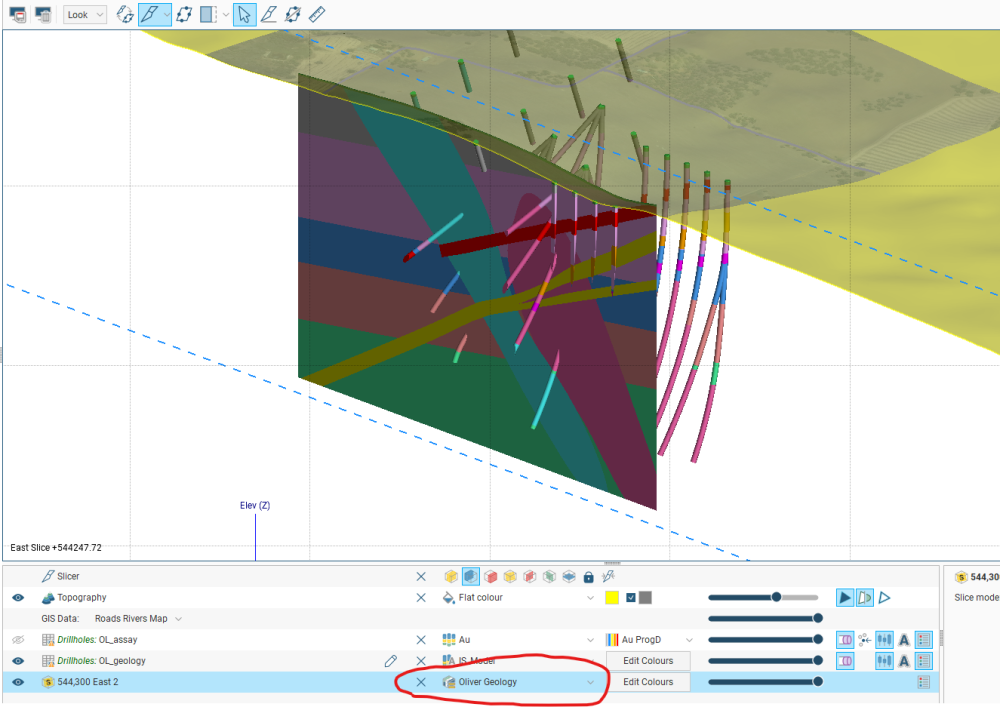
There is a display option for this in the shape list below the main scene. Click on the dropdown arrow on the cross section where it currently shows the layout then select the geology (or similar) from the list of options as shown in the attached screenshot. This will get rid of the white areas.
Let me know if this helps or not.
Peter
 1
1 -
Thank you for your comment Peter. In this particular case the cross it is a cross section from an image, not a geological model. I've tried your suggestion however it doesn't seem to work with cross sections made from imported images. Is are there any work flows that I could follow for cross sections created from images to get rid of the white background?
1 -
Hi Edward,
Without seeing your cross section I reckon that you could crop out some of the white during image import or increase the transparency of the cross section in the scene. Or, perhaps there is a third party image processing app or GIS that you could use to make the white areas transparent beforehand?
1 -
Thank you for your reflection and comments. I will try eliminating the white areas before creating the cross section. As this is a cross section from an image I do not see how to include other information on it. Ideally I would use it as a background and have wells and well information projected onto it. In the scene view some the items that are behind the cross section are not visible.
0