How to delete multiple samples using import in MX Deposit

NimbusInsights
Posts: 6 
in MX Deposit
Hi everyone, does anyone know how to delete multiple samples at once using the import/export function in MX Deposit?
1
Comments
-
@GrahamAndrews @RichardMillington do any of you know how to do this in MX?
0 -
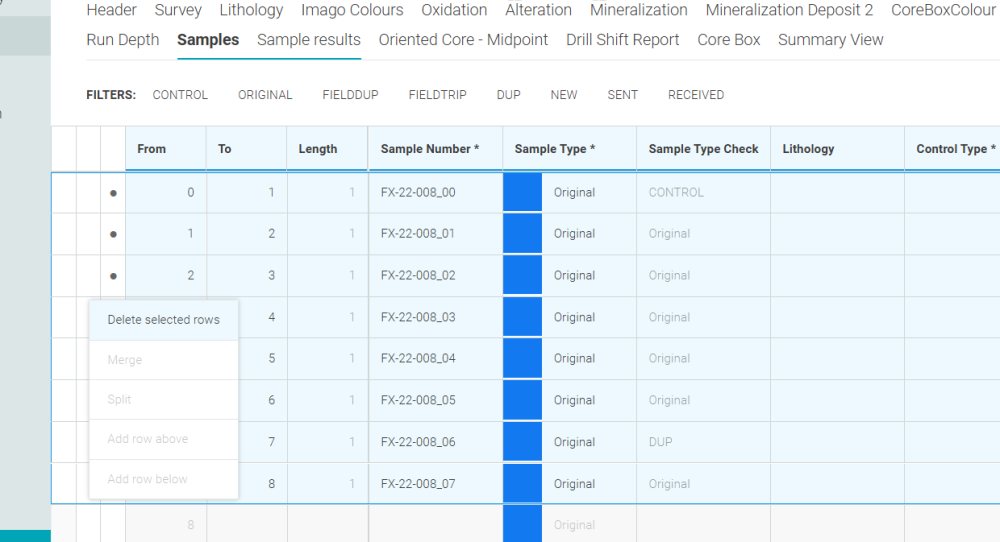
Hi, it can't be done through the import/export function. You can delete data in columns that are non-mandatory using this workflow.
To bulk delete all sampling data, you will need to contact support@seequent.com. If it's only a couple of holes' worth of data, I would suggest the classic select the rows and delete.
 2


Categories
- All Categories
- 311 Community
- 3 Get Started
- 18 Latest Releases
- 17 Member Spotlight
- 42 Learning
- 1.1K Products
- 567 Geology
- 540 Leapfrog
- 1 Volsung
- 26 Visible Geology
- 36 Data Management & Collaboration
- 14 MX Deposit
- 13 Central
- 9 Imago
- 138 Geotechnical
- 138 GeoStudio
- 334 Geophysics
- 323 Oasis montaj
- 1 Workbench
- SPIA
- 10 Res2DInv & Res3DInv
- 3 Evo
- 27 GX Developer