How can coincidental contact surfaces in Leapfrog Hydrogeology be layered without generating duplicate layers above the contact?


Hi Team,
I have a technical question regarding layering behaviour in Leapfrog when using the Hydrogeology Extension.
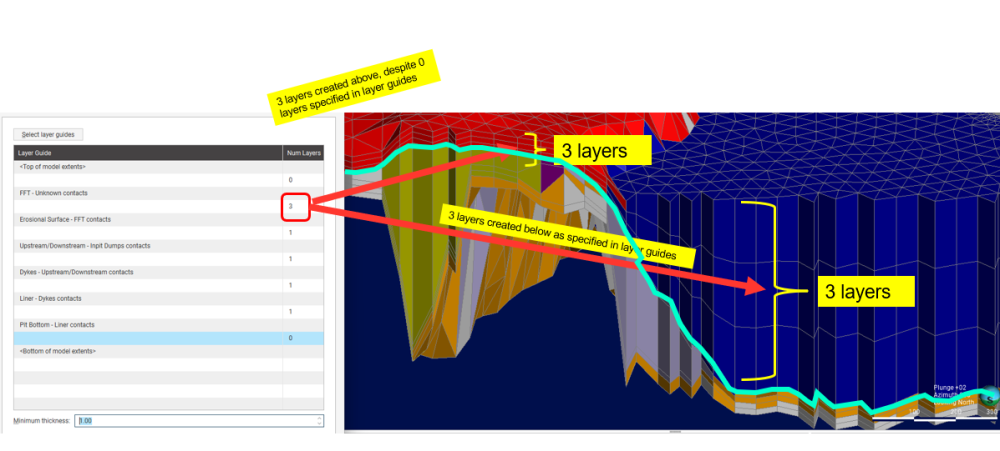
In my geological model, I have two surfaces that are in coincidental contact. When I define layer guides and specify the number of layers, Leapfrog creates the expected layers below the coincidental contact. However, it also generates the same number of layers above the contact, effectively pushing the overlying layers upward and creating geometry that does not reflect the intended stratigraphy.
Currently, my workaround is to manually adjust the elevations in FEFLOW by assigning the coincidental contact as a fixed surface and pushing the affected layers downward. While this achieves the desired result, it is time-consuming and can become difficult to manage when model revisions are required.
Has anyone encountered this issue before? Is there a recommended workflow in Leapfrog to handle coincidental contacts and layer guides more effectively? For example:
- Is there a way to constrain layering to only one side of the coincidental contact?
- Are there specific stratigraphic or hydrogeology settings that prevent the upward propagation of layers?
- Is there a better modelling approach that avoids the need for manual corrections in FEFLOW?
I suspect there may be a more efficient solution within Leapfrog, and I would appreciate any suggestions or best practices.
Thanks
Avadhoot Date
Answers
-
Hi Avadhoot,
Thanks for a great discussion point! Could you please clarify, if the coincidental contact, is essentially a volume that is particularly thin or two surfaces that very close to each other? If so, I do realise that having a very small volume with a high number of layers assigned to it, often results in the layers propagating in the volume below.Cheers
Atef0 -
Hi Atef,
The coincidental contact is essentially where 2 surfaces merge. So, it doesn't really matter whether the volume is small because, I observed that based on the assignment of the number of layers in the layer guides, the algorithm somehow creates layers above that merged contact in any case, even though the originally defined layers were below that contact. A screenshot below will explain it in detail. Could you suggest a workaround to avoid this?
Thanks
1 -
Hi Avadhoot,
Thanks for the clarification. Are you able to drop the minimum thickness to 0 and see if that avoids propagating the number of layer above FFT. In case that still does not solve it, we'd love to take a look at your data in more detail, perhaps over a call. You can reach out to us at Contact support - Seequent: Solutions for the mining, civil, environmental & energy industries and we can set something up.
Best,Atef
0

Categories
- All Categories
- 301 Community
- 3 Get Started
- 17 Latest Releases
- 16 Member Spotlight
- 42 Learning
- 1.1K Products
- 566 Geology
- 539 Leapfrog
- 1 Volsung
- 26 Visible Geology
- 36 Data Management & Collaboration
- 14 MX Deposit
- 13 Central
- 9 Imago
- 137 Geotechnical
- 137 GeoStudio
- 332 Geophysics
- 321 Oasis montaj
- 1 Workbench
- SPIA
- 10 Res2DInv & Res3DInv
- 3 Evo
- 27 GX Developer