Receiving an error message that one of the files is missing, why is that?


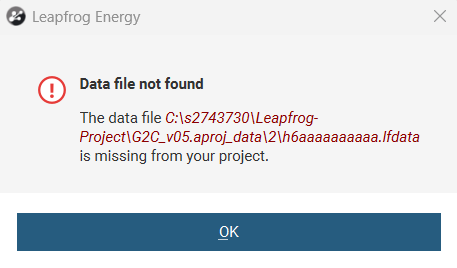
Hi, I am trying to open a project saved on my computer, but whenever it is backing up, I receive an error message that one of the files is missing even though the file is saved in the project folder.
Answers
-
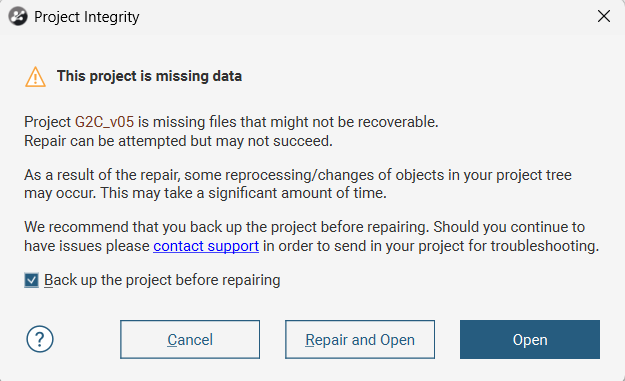
Hi @MohammadHasan can you share a screenshot here of the error message?
0 -
Hi @PrachiChitkara, when I receive the first one I choose repair and open, and then I get the second message even though the referred file is indeed in the data folders.
 0
0 -
This error usually means that the project has become corrupted for some reason. We have an article on this error in our knowledge base that gives some more detail - Error: This project is missing data
Essentially, a Leapfrog project is continuously writing files to its database. If this becomes disconnected for any reason, even for a small time, it can cause files to be missing like this. The most common reasons for corruption are working on it while it is on an external or network drive, or also moving the project while not zipped.
As the dialog says, you can attempt to restore the project (I definitely recommend creating a back up of the project first). If this is unsuccessful, you can send us a zipped copy of the project for our engineers to attempt to repair.
If you email us at support@seequent.com, it will create a support ticket and we can send you a secure link for you to upload your project and we can attempt a repair.
2

Categories
- All Categories
- 6 Community
- 3 Get Started
- 16 Latest Releases
- 15 Member Spotlight
- 40 Learning
- 2 Products
- 1 Geology
- 535 Leapfrog
- 1 Volsung
- 26 Visible Geology
- Data Management & Collaboration
- 14 MX Deposit
- 13 Central
- 9 Imago
- Geotechnical
- 136 GeoStudio
- Geophysics
- 319 Oasis montaj
- 1 Workbench
- SPIA
- 9 Res2DInv & Res3DInv
- 3 Evo
- 26 GX Developer