How can I join the intrusion intervals together


Hi all,
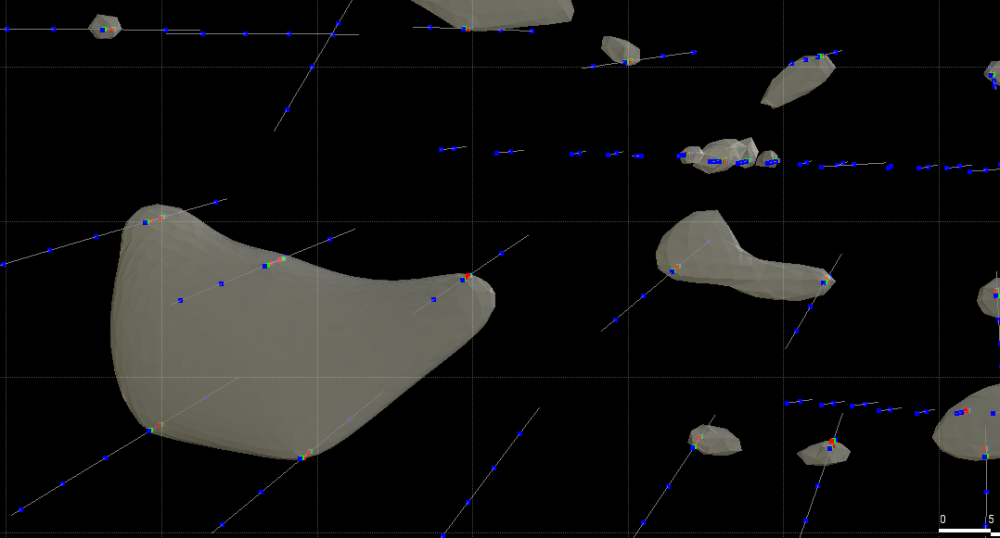
I have a small intrusion to model, but they are not joining up. the edge pretty much right next to the last drill interval.
I've tried different settings but unless I assign an extreme trend they would stay patches.
Anyone knows if there's a parameter that i can adjust so at least the edge would extend a bit more than a few centimetres?
Many thanks,
Xiaochen
Best Answers
-
Thanks for the reply. Setting the lower bound value closer to zero works! Filter exterior points kind of works, though I'm not sure what it actually does.
My interpretation of the intrusion is a set of closely stacked intrusive pockets, much like an en echelon fault. Modelling them using veining surface captures the trend but sometimes give people the false illusion of continuity. I'm currently exploring the alternative.1 -
James's comments are great. I would add though that it looks like some of your larger intrusions are fairly tabular. You may get a much better shape, with improved continuity, by using your selection column to code them out seperately, and then modelling them as a vein, and applying pinch outs.
2

Answers
-
Xiaochen,
You can try changing the "Value clipping" function to reduce the influence of 'outside' points by setting the lower bound value closer to zero. Also applying "filter exterior points" to the points contacts can also help. After that you have to start manually adding points or polylines to force joining.
However, in your picture it looks like the feature you are trying to model as an intrusion is quite thin relative to the spacing between drill holes. Leapfrog's Intrusion modelling will always struggle to join up these sorts of intervals and in this case you are better off using Vein modelling.
2 -
Glad to see it helped. Be careful with setting the clipping values though, because I have found if you are too extreme you end up with a 'pincushion' effect of the surface, where the drill hole intersections are indentations and the volume is over-estimated between holes. Filtering exterior points removes points beyond the contact buffer distance you set, so it can help a bit if you have drillholes at a low angle to the contacts. It's useful with larger data sets too because it helps reduce processing time by ignoring points.
2
Categories
- All Categories
- 286 Community
- 3 Get Started
- 16 Latest Releases
- 15 Member Spotlight
- 42 Learning
- 1.1K Products
- 563 Geology
- 536 Leapfrog
- 1 Volsung
- 26 Visible Geology
- 36 Data Management & Collaboration
- 14 MX Deposit
- 13 Central
- 9 Imago
- 136 Geotechnical
- 136 GeoStudio
- 332 Geophysics
- 321 Oasis Montaj
- 1 Workbench
- SPIA
- 10 Res2DInv & Res3DInv
- 3 Evo
- 27 GX Developer