GX Development unexpected error


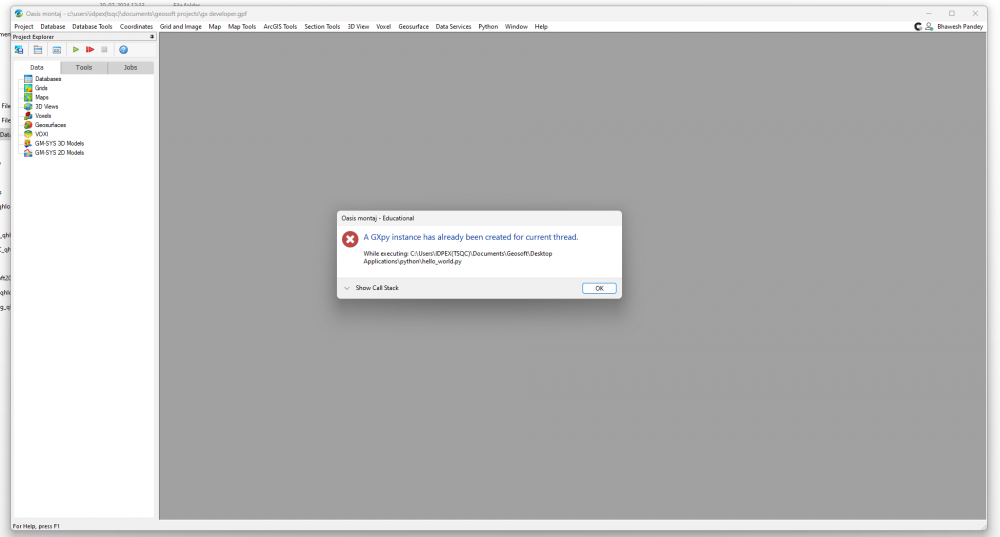
I just started learning GX development with python. I installed the latest version 2023.2 of Geosoft Viewer. Also, I installed Python 3.8.3 and Geosoft Python modules and verified the installation. Now I am trying to run hello_world_extension.py, the very first example from the tutorial and getting error: A GXpy instance has already been created for the thread. I have nothing else running in the viewer at the same time. The line of code causing the error is
gxp = geosoft.gxpy.gx.GXpy()
Can anyone suggest me how to solve the problem?
Answers
-
Hi Pavel,
I think there was an error with the Hello_world.py code
You'd have to change it fromgxp = geosoft.gxpy.gx.GXpy()
to
gxp = geosoft.gxpy.gx.gx()0 -
Hi Naima,
Thank you for your reply.
I also figured this out and simply access properties of the already existing GXpy instance using gxpy.gx.gx().***,
gxpy.gx.gx().gid for example.
0 -
Hi @NaimaShariff and @PavelTishin1, how you have setup the path in Geosoft for running python. I have attached the error file which it is showing. Please could you help.
0
Categories
- All Categories
- 302 Community
- 3 Get Started
- 17 Latest Releases
- 16 Member Spotlight
- 42 Learning
- 1.1K Products
- 565 Geology
- 538 Leapfrog
- 1 Volsung
- 26 Visible Geology
- 36 Data Management & Collaboration
- 14 MX Deposit
- 13 Central
- 9 Imago
- 137 Geotechnical
- 137 GeoStudio
- 332 Geophysics
- 321 Oasis montaj
- 1 Workbench
- SPIA
- 10 Res2DInv & Res3DInv
- 3 Evo
- 27 GX Developer