Leapfrog Edge, Reporting


Hi everyone,
In Leapfrog Edge, how do I create a report for two elements with different units, for example, copper as a percentage and silver as ppm?
Thanks in advance.
Aboubacar
Comments
-
Hi Aboubacar,
If you have used the input values of % for Cu and ppm for Ag, and have not changed them via calculation in your block model, then nothing will have changed.
The report you generate will automatically have Cu as % and Ag as ppm in your report. Leapfrog does not care what the units are though, so your report will have just numbers. You need to choose the correct unit when you finalise your report. Select the column your grade results are in and on the left, a panel will give you the option to select the units (as in the picture attached)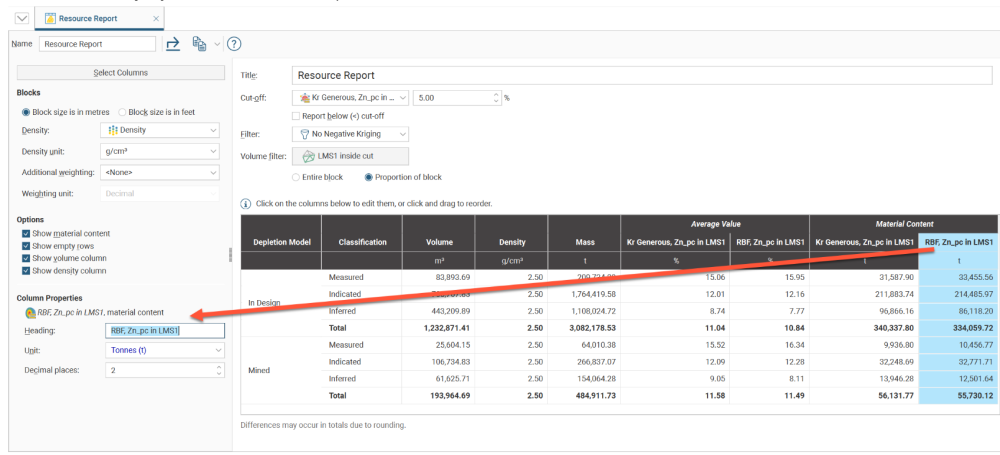
Full details of the report generation process are here: Resource Reports
Best regards, John
2 -
Thank you, @JohnTyrrell
1


Categories
- All Categories
- 288 Community
- 3 Get Started
- 16 Latest Releases
- 16 Member Spotlight
- 42 Learning
- 1.1K Products
- 565 Geology
- 538 Leapfrog
- 1 Volsung
- 26 Visible Geology
- 36 Data Management & Collaboration
- 14 MX Deposit
- 13 Central
- 9 Imago
- 136 Geotechnical
- 136 GeoStudio
- 332 Geophysics
- 321 Oasis montaj
- 1 Workbench
- SPIA
- 10 Res2DInv & Res3DInv
- 3 Evo
- 27 GX Developer