Delustering in Leapfrog ( from new Prep dataset workflow0


Do anyone understand / how to interpret the Delustering in Leapfrog ? I usually use Supervisor, and its fairly "easy" to understand and interpret and know what I need to look for and what to set my declustering value as etc. But in Leapfrog alot of moving parts, and so sensitive when changing parameters. Any tips ? tricks? Approach
Answers
-
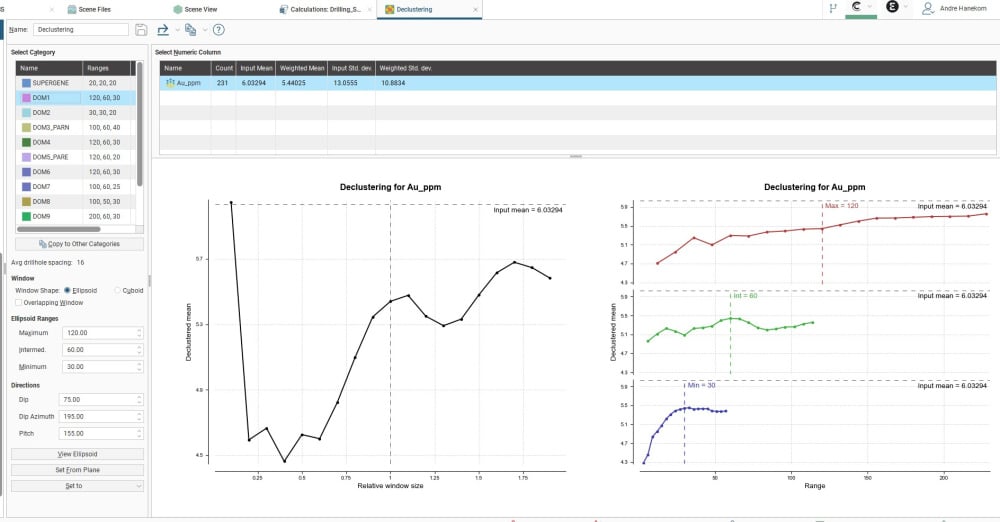
This is not an image to add comments on what is right / wrong..example of the display and where I referring to it
0 -
Hi @andrehanekom1 you almost always want to check the Overlapping Window when declustering: this takes your window size and offsets the origin of the window multiple times and takes the average, yielding smoother graphs and a more reasonable result.
It looks like you're declustering by domain. The main thing is to set your default window size to reflect the maximum drillhole/sample spacing in the domain and align it to your domain, so e.g. if your domain has holes up to 50m apart, the ellipsoid ranges should be close to half that, with a consideration for the minor axis/downhole sample spacing. The graphs show how sensitive the declustered mean is (the curves) to the window size, and you ideally want to calibrate the window size to a stable low point/trough (a place where there is no significant change to the mean with changes to the window size). Sometimes this is easier to achieve by manipulating only one of the axes (e.g. your declustered mean is more sensitive along strike than down dip, which you can see in the individual axis graphs). In some cases this can reveal sub-populations in your data e.g. the mean is stable in your major and semi-major axes but not your minor axis.
There will be times when you won't be able to achieve a good result, so in this case just stick with the base case (~half of your coarsest drillhole spacing), but with the new Data Preparation workflow you can test multiple Declustering objects and their effect on your subsequent estimation runs.2 -
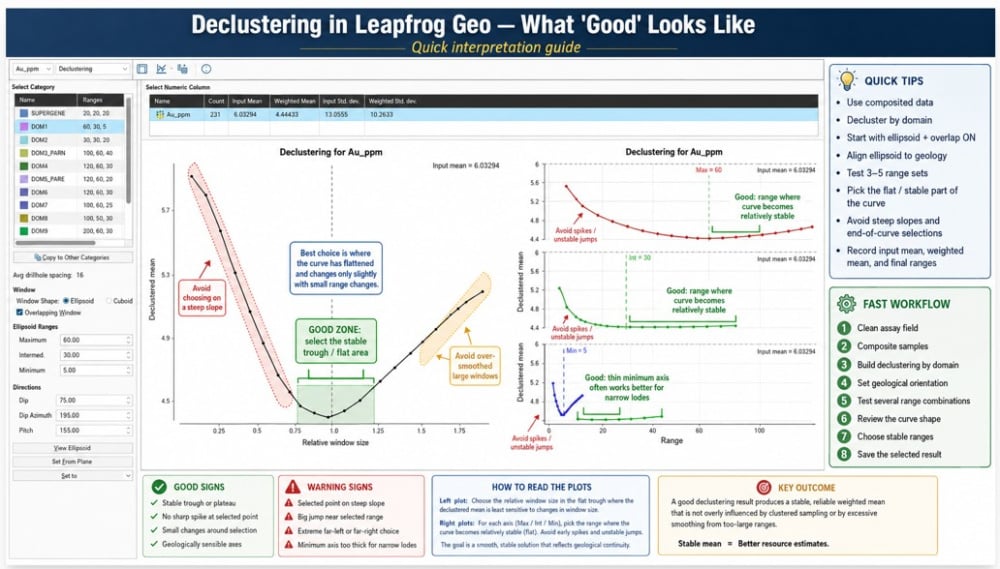
thank you Erik , I went down a deep dive into this, as I normally use Supervisor, but all my estimates are in Edge, so had to get inti this, to make my MRE process easier.
 1
1 -
decided to make a guide and also help other users in my community ;) that I regularly engage with asking for guidance.
1


Categories
- All Categories
- 302 Community
- 3 Get Started
- 17 Latest Releases
- 16 Member Spotlight
- 42 Learning
- 1.1K Products
- 565 Geology
- 538 Leapfrog
- 1 Volsung
- 26 Visible Geology
- 36 Data Management & Collaboration
- 14 MX Deposit
- 13 Central
- 9 Imago
- 137 Geotechnical
- 137 GeoStudio
- 332 Geophysics
- 321 Oasis montaj
- 1 Workbench
- SPIA
- 10 Res2DInv & Res3DInv
- 3 Evo
- 27 GX Developer