New install has no Oasis Python enviroment


I used windows installed apps → uninstalled oasis. Then installed Oasis again (Geosoft 2025.2.1 Setup 53 2026.02.05.exe).
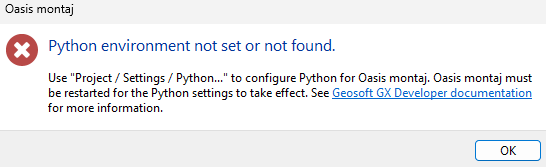
Any python extension doens;t work anymore. Yielding the below error dialog.
Indeed, folder
C:\Program Files\Geosoft\Desktop Applications\python
is completely empty.
I am pretty sure that
packages/python-3.11.9-embed-amd64-om.zip
is supposed to be unpacked during the installation to that python fodler. Is this a bug in the installer?
Comments
-
Hi @VictorSavenije. You are partially correct. The contents of that zip are unpacked into the python directory, but there are a few extra steps being done. Behind the scenes, there is the following "post install" action the installer runs that sets everything up:
C:\Program Files\Geosoft\Desktop Applications\bin\geosoft.installer.utility.exe" -install_python -workingdir="C:\Program Files\Geosoft\Desktop Applications\bin" -python_path="C:\Program Files\Geosoft\Desktop Applications\packages" -destination="C:\Program Files\Geosoft\Desktop Applications\python"You can run this manually after install and if successful it should resolve your issue.
I was unable to reproduce this problem when running the installer, but sometimes there are machine-specific issues. You can check for the outcome of the "post-install" utility action by looking at the log file generated during installation. Its at
%TEMP%\Geosoft_Desktop_Applications_DATETIME_NUM_GeosoftPackageX64.log0 -
Thanks for the information. Running geosoft.installer.utility.exe indeed solved it too.
But I actually I did not tell exactly how I got the issue: I uninstalled, then installed RELEASE_DESKTOP_APPLICATIONS_2025.2.0_42_11_27_2025_setup.exe
(don't know where our organisation got his from at this moment). That one had the issue. Then I ran Geosoft 2025.2.1 Setup 53 2026.02.05.exe (without first uninstalling).
Now uninstalled, and ran 2025.2.1 Setup 53 2026.02.05.exe, which installs properly.
0

Categories
- All Categories
- 300 Community
- 3 Get Started
- 17 Latest Releases
- 16 Member Spotlight
- 42 Learning
- 1.1K Products
- 565 Geology
- 538 Leapfrog
- 1 Volsung
- 26 Visible Geology
- 36 Data Management & Collaboration
- 14 MX Deposit
- 13 Central
- 9 Imago
- 136 Geotechnical
- 136 GeoStudio
- 332 Geophysics
- 321 Oasis montaj
- 1 Workbench
- SPIA
- 10 Res2DInv & Res3DInv
- 3 Evo
- 27 GX Developer