Dark Mode for Geo
Hallo All, is there a dark mode for Geo?
Best Answer
-
Hello what do you mean by that? like full dark mode for the interface (menus,panels, tree, etc…)
1


Answers
-
HI Charles, yes that's right - dark mode interface as you desribed
0 -
Currently there is no dark mode setting in Leapfrog.. Thanks for the feedback!
The only way is forward!0 -
I'd like to pitch in and say that it would be a great feature.
0 -
I would love this feature as well! much easier on the eyes if the project tree and shape list had a dark mode.
1 -
Yes! Dark mode please. Easier on the eyes and for the high contrast!
0 -
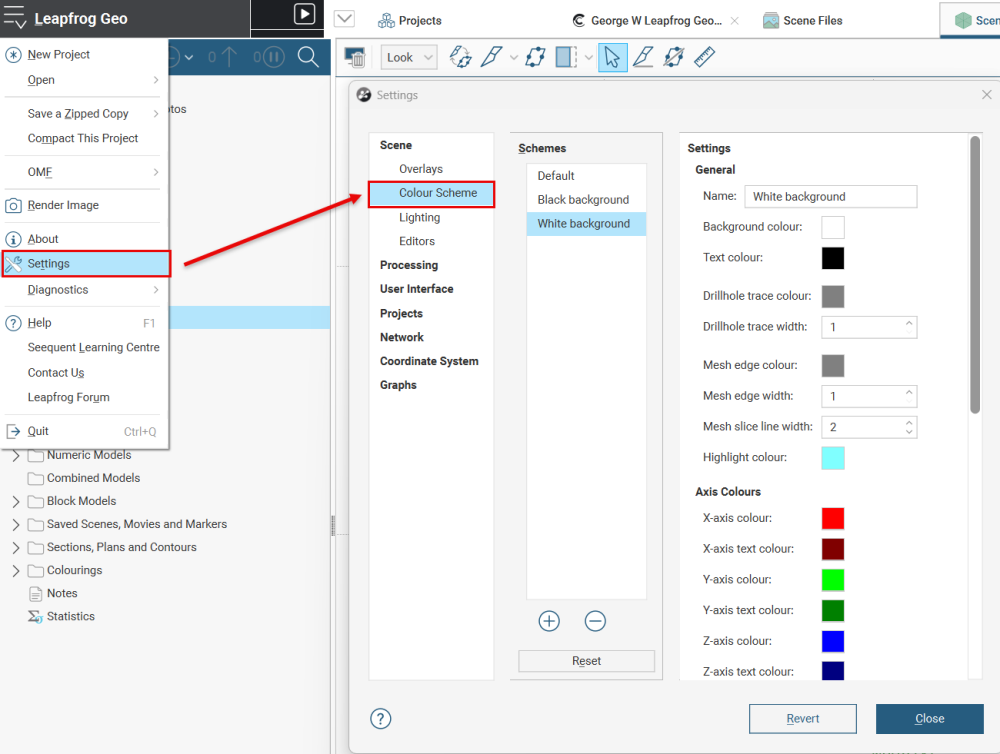
Hi @PaulaOgilvie1 you can change the scene background colour in Leapfrog if this is any help?
If you click on main menu > settings > scene colour scheme you can tweak your colour settings.
 0
0 -
You can only change the background as GeorgeWhitehouse pictured or try to go to your desktop screen right clic, personalize,colors, choose your mode as black (I do not know if this can affect your Leapfrog Geo settings also. I have never tried)
1 -
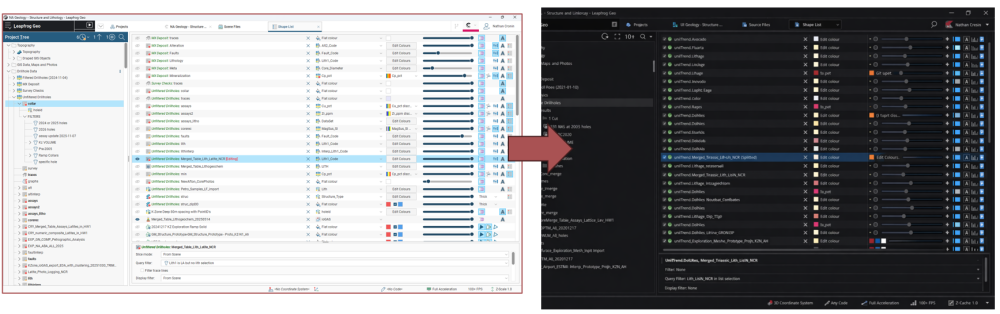
@GeorgeWhitehouse I'm definitely using a dark background in my scene, but i think we're all interested in a dark project tree and shape list like this. It's similar to what you can do in Office, Chrome and other windows applications. It's much easier on the eyes.
 1
1 -
I see, thanks for the feedback!
0 -
Hi everyone,
Personally, I only use dark mode in a few specific situations, often in dimly lit environments. Here is an article that summarises the findings of my extensive research into dark mode:
Dark Mode Isn’t Better For You, But We Love It Anyway
In conclusion: Those who like it should use it; the rest can stick with light mode.
Cheers,
2




Categories
- All Categories
- 288 Community
- 3 Get Started
- 16 Latest Releases
- 16 Member Spotlight
- 42 Learning
- 1.1K Products
- 565 Geology
- 538 Leapfrog
- 1 Volsung
- 26 Visible Geology
- 36 Data Management & Collaboration
- 14 MX Deposit
- 13 Central
- 9 Imago
- 136 Geotechnical
- 136 GeoStudio
- 332 Geophysics
- 321 Oasis montaj
- 1 Workbench
- SPIA
- 10 Res2DInv & Res3DInv
- 3 Evo
- 27 GX Developer