Issues Importing Geosoft .GRD into ArcGIS Pro (Plugin Not Installing)

Hello everyone,
Hope you’re being well.
I need some guidance on importing a .grid file from Oasis montaj into ArcGIS Pro.
As you may know, Geosoft grid outputs often open only as images in ArcGIS, without true raster data values. I’m trying to bring Geosoft grids into ArcGIS Pro as proper numeric raster files.
I also attempted to install the Geosoft plug-in for ArcGIS Pro (tested on ArcGIS Pro 3.5 and 2.8), but the installer can’t connect to the Seequent server to download and complete the installation.
If anyone has a guide, instructions, or video tutorial to resolve this issue—or a reliable workflow for converting Oasis montaj grids to usable raster formats in ArcGIS Pro—I would really appreciate your help.
Thank you for your comments and suggestions. 🙏
Comments
-
Hi Sayyed Mohammad Hosain,
Please note the current version of Target for ArcGIS Pro can be run on the supported version of ArcGIS Pro 3.4, ArcGIS Pro 3.4.2 and ArcGIS Pro 3.4.3
Uninstall ArcGIS Pro 3.5
Install ArcGIS Pro 3.4 through the ArcGIS Pro software.
Install Target for ArcGIS Pro 2024.2 using the installation file available from the download link on the Product Page for the 2024.2 release (my.seequent.com/products).I hope this helps,
Farzaneh Farahani,
Project Geophysicist
1 -
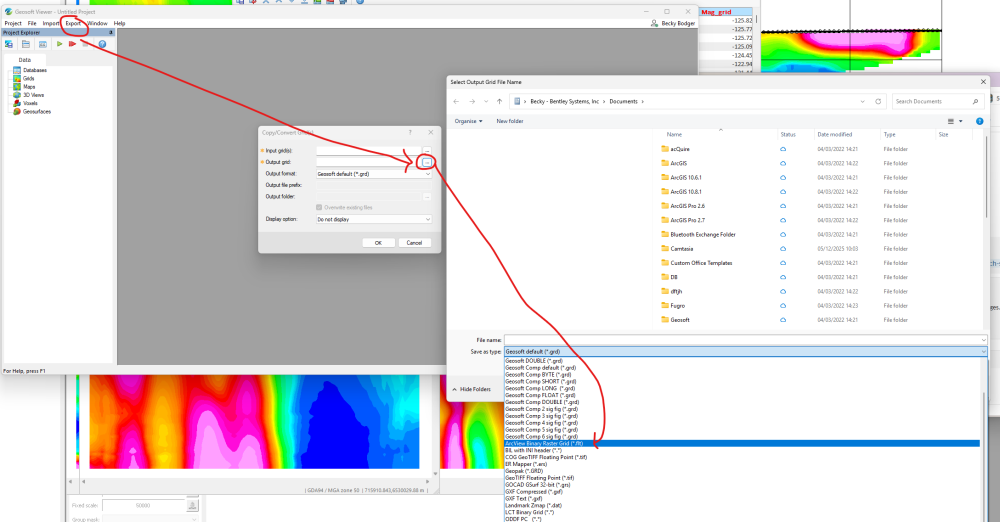
Hi Sayyed, Another option in Oasis montaj is to export the grids as *.flt grids, or request them in the *.flt format from your contractor. We import/export a number of industry standard grid formats from within Oasis montaj. Maybe something to consider for future if you do not have access to Oasis montaj and you still can't get the ArcGIS Pro free plugin to work (or don't want to downgrade your 3.5 version of ArcGIS Pro to 3.4). You could also try to install the free Geosoft Viewer (standalone). The free Geosoft Viewer lets you open a grid and export it to another format. The *.flt grid is native Esri format and should open as expected in ArcGIS Pro.
In the Geosoft Viewer (download here):
Export > Copy/Convert Grid > Select your Input Geosoft grd file > Click the … beside Output and pick *.FLT from the drop down list.
 2
2

Categories
- All Categories
- 288 Community
- 3 Get Started
- 16 Latest Releases
- 16 Member Spotlight
- 42 Learning
- 1.1K Products
- 565 Geology
- 538 Leapfrog
- 1 Volsung
- 26 Visible Geology
- 36 Data Management & Collaboration
- 14 MX Deposit
- 13 Central
- 9 Imago
- 136 Geotechnical
- 136 GeoStudio
- 332 Geophysics
- 321 Oasis montaj
- 1 Workbench
- SPIA
- 10 Res2DInv & Res3DInv
- 3 Evo
- 27 GX Developer