How can I refine the mesh around faults in Leapfrog?


Hi everyone,
I’m generating a TOUGH2 mesh in Leapfrog Energy and I would like to apply local refinement around faults to better capture their geometry and influence zones. Do you know if is that possible?
Thanks in advance! Have a great day!!
Best Answer
-
Hi Christhian!
Are you creating a structured or an unstructured mesh?
Structured grids can be manually refined in the X,Y,or,Z direction by dividing the space on each row/column/layer.
This allows you to refine along the overall trend of a fault, but doesn't let you actually refine along the fault itself.Unstructured grids will let you do this though.
The fault should be in the Geologic model you're basing your grid off (if not you can also use a polyline to represent the area of refinement).Once the unstructured grid has been created you can double click the "2D Grid" button and define the refinement level.
Here's an example showing a 5-step refinement along Fault 3.
*NOTE: it will refine over a projected straight representation of a fault on a 2D grid at the bottom of the model, so if you have faults with low angles this may not achieve the desired outcome.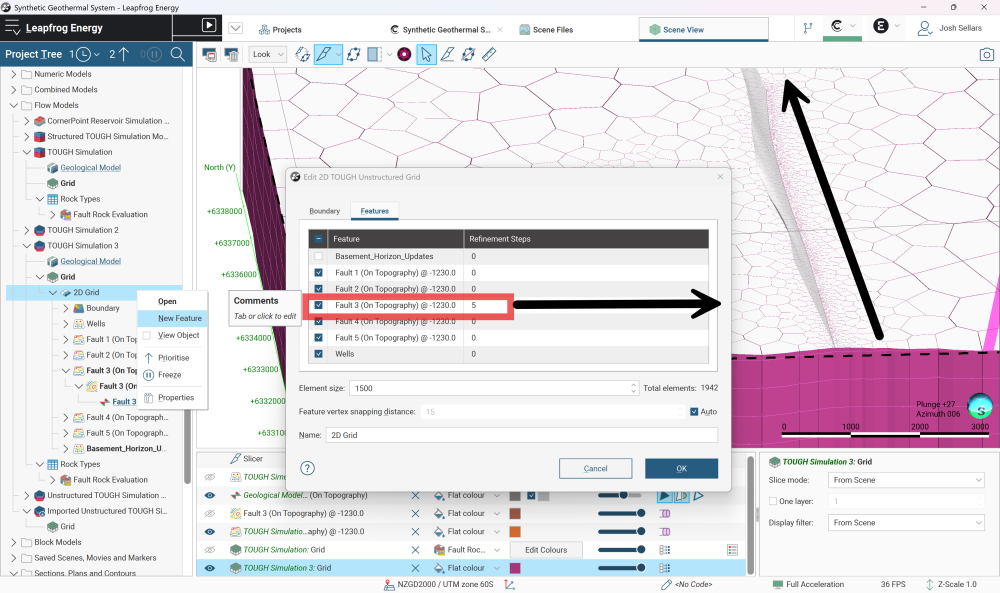
Hope this helps!
Josh
2

Answers
-
Thank you for your help, this information is really useful. I am currently working with a structured mesh, but I am considering switching to an unstructured mesh. However, I have not yet been able to properly control the block size, since the maximum allowed value is 2000, which leads to an excessively large number of cells in the mesh.
0 -
I just realized that this option also allows me to control the element size of the model as well. Thanks a lot!
1
Categories
- All Categories
- 288 Community
- 3 Get Started
- 16 Latest Releases
- 16 Member Spotlight
- 42 Learning
- 1.1K Products
- 565 Geology
- 538 Leapfrog
- 1 Volsung
- 26 Visible Geology
- 36 Data Management & Collaboration
- 14 MX Deposit
- 13 Central
- 9 Imago
- 136 Geotechnical
- 136 GeoStudio
- 332 Geophysics
- 321 Oasis montaj
- 1 Workbench
- SPIA
- 10 Res2DInv & Res3DInv
- 3 Evo
- 27 GX Developer