💥 Exciting Updates in Visible Geology!

We’re thrilled to announce some powerful new features designed to make your geological modelling experience more intuitive, efficient, and visually clear.
👀 Plus, Google account login for Visible Geology is coming soon! Keep an eye out for more information.
Here’s what’s new:
👉🏼 Edit custom topography
No more starting from scratch! You can now reshape, refine, and adjust existing custom topographies directly within Visible Geology.
👉🏼 Import stereonet data
Save time by instantly importing planar or linear data from spreadsheets or text files - no more manual entry!
👉🏼 Create topography from contour lines
Gain full control over your topographies by using contour lines and elevation data to create precise models.
👉🏼 Lithology legend display
Easily view the lithologies in your models with a new dynamic legend. As you model, the legend updates!
👉🏼 Stereonet rose plot
Generate, view and export intuitive rose plots from your existing project data to visualise structural patterns.
👉🏼 Stereonet toggle for poles and planes
The new toggle feature lets you show or hide poles and planes in the Stereonet view, keeping your diagrams clean and focused.
👉🏼 Set colours for assignments
It's now easier to differentiate and organise multiple assignments visually with custom colours.
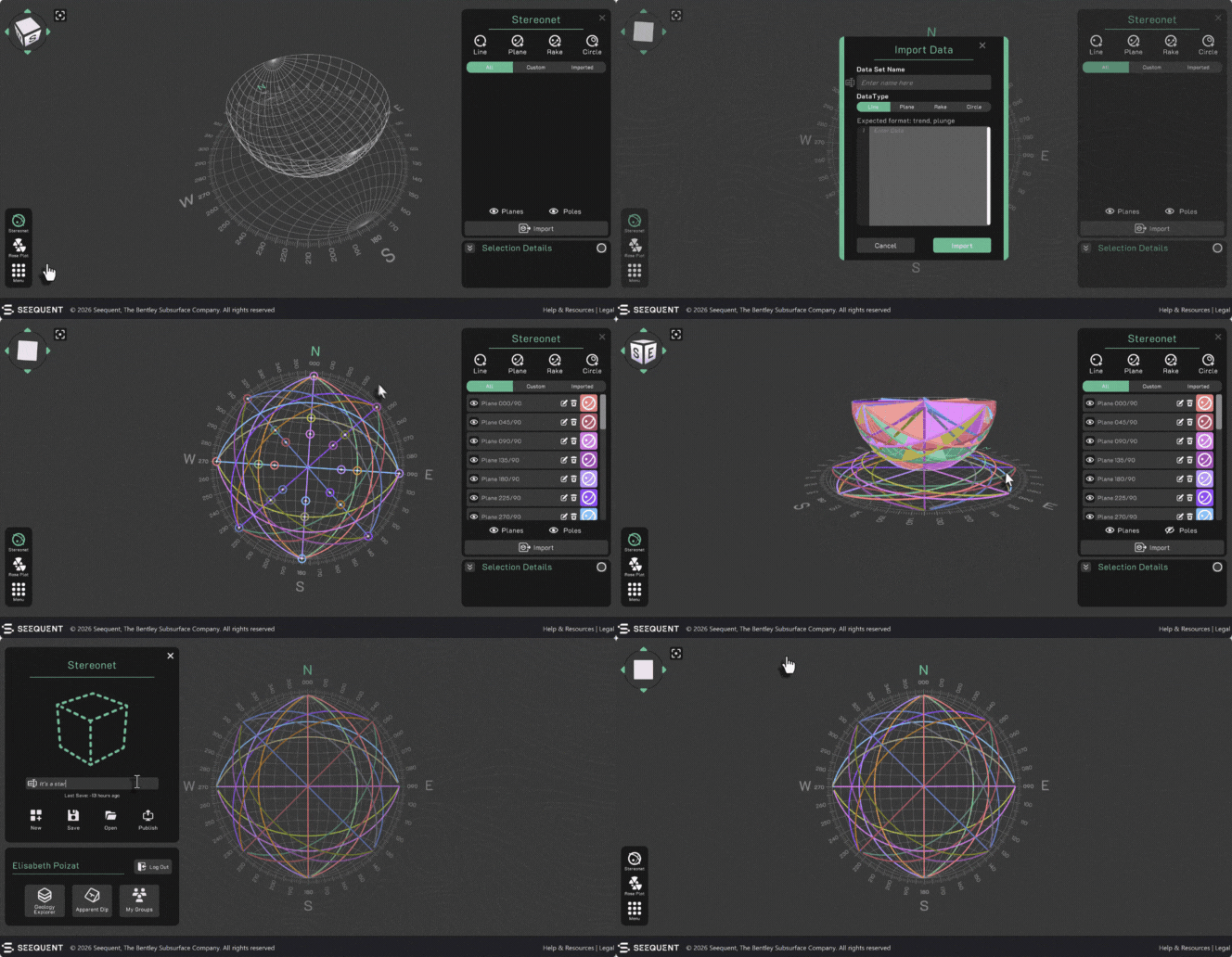
Shown above: Importing stereonet data
We’ve also resolved some pesky bugs to make your experience smoother, including:
- Plunge fold behaviour bug fixed
- Unity upgrade implemented
- Stereonet auto-naming vs parameter confusion resolved
- Zoom speed adjusted for better control
- Decals no longer cross models
Ready to explore these improvements? Visit www.visiblegeology.com, log in to Visible Geology and experience the updates today!
Comments
-
Hello there !
My name is Chini and I am a structural geology PhD student. I love your visible geology tool, especially the ability to build a 3D model and import strike/dip data from that into a Stereonet . I have a question/request. I am not sure who to ask but am starting by posting here. I am wondering: would it by any chance be possible for you guys to introduce the ability to import linear features from 3D models into the Stereonet? E.g. add decals for linear features then plot them on a Stereonet? I think it would be really useful ! I am currently trying to understand folding of lineations and I think your program would be an awesome educational tool for this! . It would be nice to be able to visualise on a Stereonet for instance how stretching lineations are folded about folds of different orientations, tightness etc! The results would depend on the type of folding (e.g. buckle folding vs flexural slip/flow vs shear folding etc ) but anyway would be really nice to import linear features from the 3D model into the Stereonet tool! If you already have the ability to import planar features, surely adding linear features would be possible too?
Warmest of regards!
Chini
0 -
Hi Chini,
Happy New Year and thanks so much for sharing your idea and for being such a fan of Visible Geology! We really appreciate the thought you’ve put into this.
Adding linear feature decals in 3D and importing them into the stereonet is a fantastic suggestion. It would make workflows more intuitive and help with teaching concepts like rake and even how to approach finding hinge lines in folds. We can absolutely see the value this would bring for educators and students.
We do have a pretty big backlog at the moment, but this is definitely something we’ll look at as we continue to evolve the stereonet and 3D modeling tools. Your feedback helps us prioritise what matters most to the community.
Thanks again for taking the time to share! If you have any examples of how you’d use this in teaching, feel free to drop them, we’d love to hear more.
Eli
1 -
Hello! I’m a teacher from China and a huge fan of Visible Geology. I use your tool constantly in my classroom to help students visualize geological concepts, and it has made such a difference to my lessons.
Recently, I noticed that Visible Geology now requires a Google account to log in. Unfortunately, Google services are inaccessible in China, so I’m no longer able to use the tool with my students.
I was wondering if there’s an alternative login method, such as an email/password sign-up, or any other solution that would allow me and my students to keep using Visible Geology.
Thank you so much for creating such an amazing educational resource. I really hope we can find a way to keep using it in our classes.
1 -
Hi Jinxianhuang
Thank you so much for your kind message and for using Visible Geology in your classroom. We’re really glad to hear it’s been helpful for your students.Can I still use Visible Geology without a Google account?
Yes. You and your students can still access and use the Visible Geology modules without logging in.What won’t work without Google login?
Features that require an accoun,: groups, assignments, and saving work, are now only available when logged in with a Google account.Why was this change made?
The move to Google login was a company‑wide decision to keep Visible Geology secure and sustainable long‑term. Supporting multiple login systems would have made access more complex and harder to maintain in the future.Is there an alternative login (e.g. email/password)?
At this time, no. We understand this is particularly challenging in regions where Google services aren’t accessible, and I will take account of this feedback internally.Thank you again for your support and for reaching out! We truly appreciate it.
Kind regards,
Elisabeth1
