How to produce mining compliance mesh out of two asmined surfaces mesh

I want to get a mining compliance mesh coloured to show places undermined/overmined given two asmined surfaces
Answers
-
You can create a distance function on one of the surfaces then create an evaluation using that function on the other surface and colour using the distance value. The difficulty here is that the distance function is a buffer around the object that doesn't distinguish between "outside" and "inside" direction so you won't easily show the undermined vs overmined.
0 -
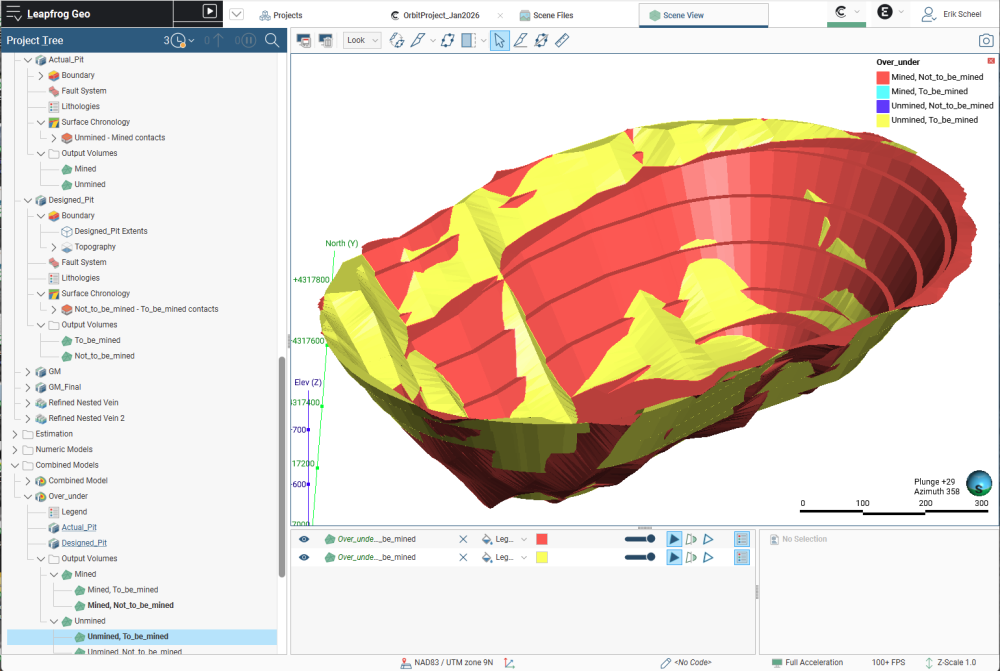
You might be able to pull this off with a Combined model. Make your first GM (no base lithology) and call it Designed. Add two lithologies: To_be_mined, and Not_to_be_mined. Then make a new Erosion/Intrusion surface → From Surface and use your designed mesh, To_be_mined younger than Not_to_be_mined. Activate the surface with Not_to_be_mined as your background lithology
Then make your second GM (also no base litholgy) and call it Actual. Add two lithologies: Mined, and Unmined. Then make a new Erosion/Intrusion surface → From Surface and use your as-mined mesh, Mined younger than Unmined. Activate the surface with Unmined as your background lithology
Then Create a new Combined model with all 4 volumes. Your Mined, To_Be_Mined volume will be what you intended to pull out; your Mined, Not_to_be_mined is your Overmined (you can rename the volume); your Unmined, To_be_mined is your Undermined, and your Unmined, Not_to_be_mined is what you kept in the ground.
 1
1
