Custom labels in cross sections


I'm generating cross-section layouts for another person to draft for inclusion in public reports. I would like to be able to create labels for economic composites displayed on the section in the format "metres @ grade", eg 4.5m @ 2.5 g/t Au. This way I can export the layout and the draftsperson can pick up the text objects and use them directly. The custom labeling is possible in the scene viewer, but as far as I can see it's not available for a section layout. I have a fairly clumsy workaround at the moment where I make the labels for the composites in Excel then import the csv file with the labels as categories back into Leapfrog and use them in the section layout. Has anyone else attempted something similar with a better solution? The image shows an example of what i have managed to do and what I'm trying to achieve.
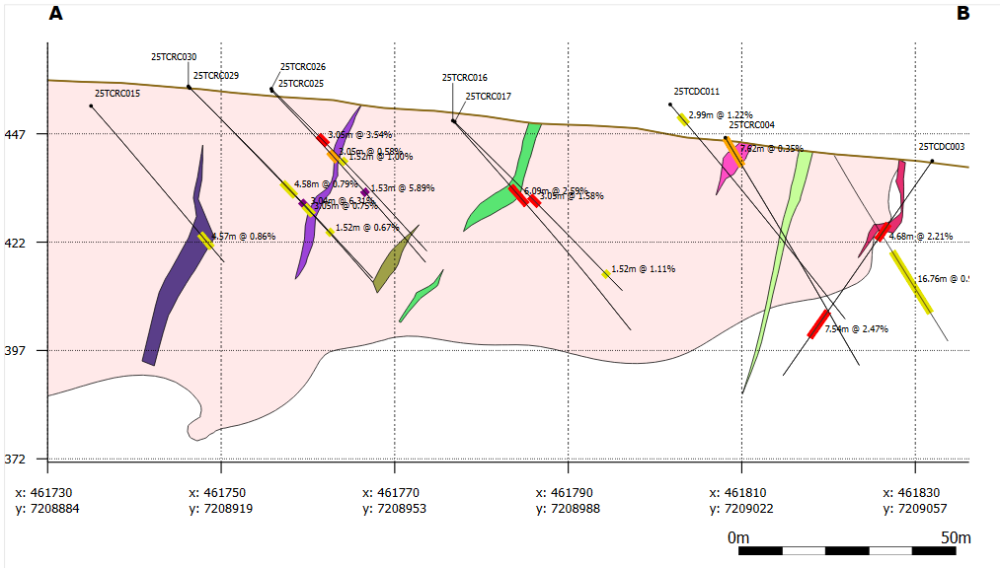
Comments
-
Hi @JamesLally I think @findlayfraser might be able to help you.
Hi Findlay, have you attempted this and/or have any insights that might help?
0 -
Anyone in Seequent available to comment on whether there is a solution to my query? Otherwise I think it would be a useful addition to a future release to allow the same label creation function in the Layout window. What would also be helpful in this case would be the ability to create a text label within a data table using both category and numeric columns. There's currently no way I can see to convert numeric to text using a Calculated field.
0 -
At this point in time (2025.3) your method is the quickest method. The calculations does not support workflows to mix text and numbers.
You could get something similar by binning the grades, but that would defeat the purpose in this case I guess.
The only way is forward!0 -
thanks @NiklasSääv, I had also come to the same conclusion. For future development, allowing custom label text creation in the layout window would be more useful for the problem I'm trying to solve. The drawback of making a label as a column in an interval table is that to be able to plot on the section it has to be a Category column, which makes things like colouring really annoying.
2

