How to draw geometry for SEEP/W, using csv file having latitude longitude and bed elevation data?

Hello,
I am working on seepage and slope stability analysis in GeoStudio. I have a CSV file containing latitude, longitude, and river bed elevation from field survey data, and I can already plot the bed profile in Excel.
I would like to know:
Is it possible to import a CSV (XYZ) file directly into GeoStudio to create the riverbank cross-section geometry, instead of drawing it manually point by point?
If not, what is the recommended workflow to use such survey data to build the geometry in GeoStudio?
(More specifically, I want to create the riverbank cross-section geometry from the measured bed profile avoid manually drawing the geometry point-by-point, Use the real surveyed profile for seepage and slope stability analysis)
Thank you.
Answers
-
Hi,
If you have a license for the 3D module, you can import CSV or XYZ format files via the built-in data point import function in Build3D, as shown in the figure below. This allows you to create a 3D ground surface model, from which you can then select the location for a 2D cross-section.
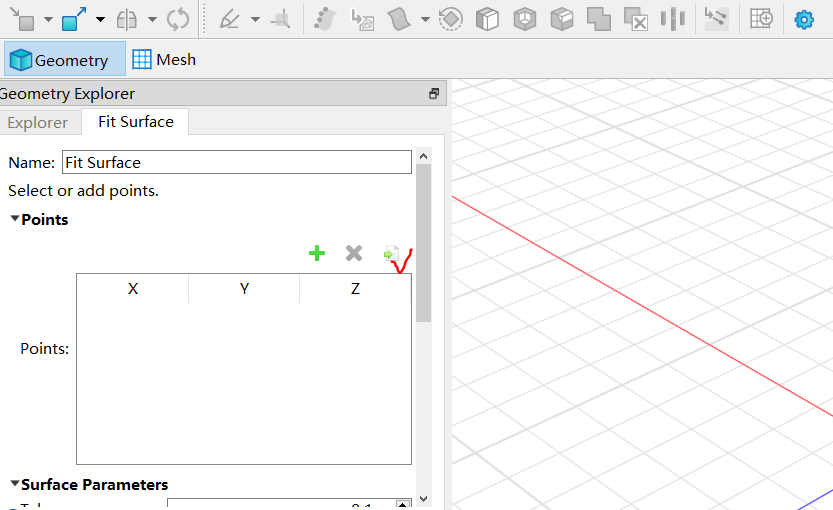
If your data uses latitude and longitude coordinates, you will need to convert them to XYZ coordinates. This can be done using GIS software. If you have further questions, feel free to leave another message and attach your data point file.
Kind regards,
Walter.
1
